You can now use your Diabetes Contour glucose machine to record your readings directly into the Contour Diabetes App. This will then be linked to us so our Diabetic Nurse can review your blood sugars remotely.
Before this can be set up, there are a few steps you will need to complete
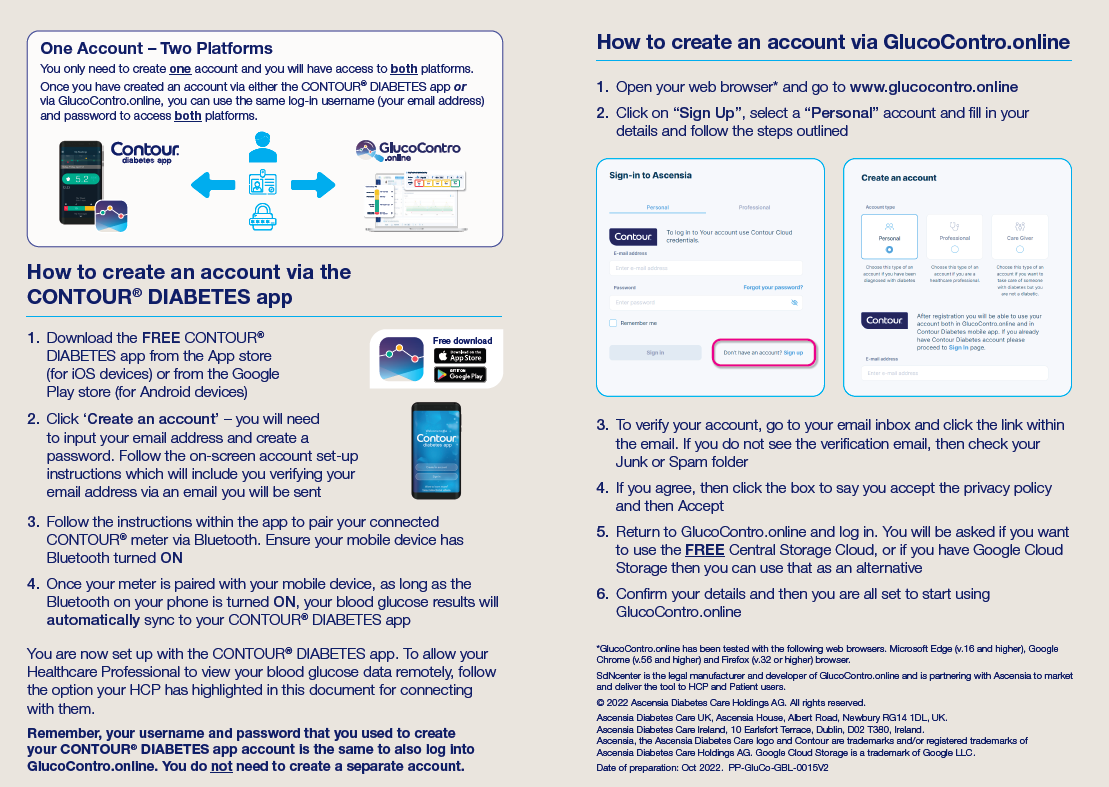
1) Download and register for the Contour Diabetes App from the Google or Apple play store. It will then let you add your machine to the app via bluetooth.
2) Register for the GlucoContro.online system by clicking here using the same login details from the app above.
3) Enrol to our clinic using the code HEW8. Our practice nurse can then remotely monitor your blood glucose results,
Please follow the step by step instructions below:
STEP 1 AND STEP 2
STEP 3
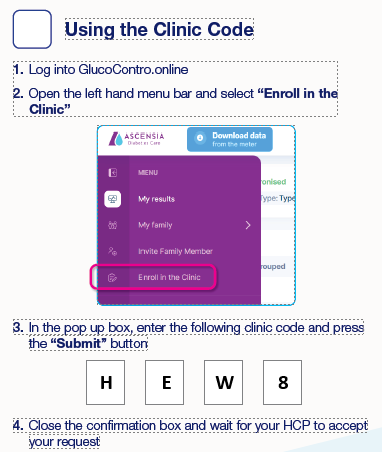
Thats it you are all done. Now when your blood glucose levels are inputted onto the machine, our Diabetic Nurse can see these results.